Scale Shifter guide · Setup
How to route a MIDI plugin to an instrument in your DAW
A MIDI instrument makes no sound until its notes reach an instrument. Here is the routing step, per DAW, and the format each one can actually use.
What a MIDI instrument plugin actually does
Alea Scale Shifter generates MIDI notes. By default it makes no sound of its own, which is the part that surprises people: you load it, press play, watch the keyboard light up, and hear nothing. That is the plugin working correctly. Its notes have to reach an instrument before anything comes out of your speakers.
There are two ways to get sound, and they suit different jobs.
Set OUT to Internal Synth and the plugin plays its own sound, with ten to choose from including a sampled upright piano. Nothing to route, nothing to configure. This is the fastest way to hear what the app is doing, and it is a perfectly good way to work if you want an idea quickly.
Leave OUT on MIDI to DAW and the notes go to your host instead, so you can drive any instrument you own. That takes one routing step, and the step is different in every DAW. The rest of this guide is that step.
Pick the format your DAW can actually use
The installer offers VST3, AU, CLAP and a standalone app. Which one you load matters more than usual here, because a MIDI plugin depends on the host being willing to carry its output to another track.
Ableton Live and Cubase: use the VST3. In Live, do not use the AU version. Live cannot route MIDI out of AU plugins at all, so the AU will load and appear to work while never reaching your instrument. This single fact accounts for most reports of a silent plugin.
Logic Pro and GarageBand: use the AU, with OUT set to Internal Synth. Logic cannot route MIDI out of AU plugins either, so treat it as a self-contained instrument there and use its own sound.
Bitwig and Reaper: CLAP or VST3. Both hosts route plugin MIDI properly, so either format works and the choice is yours.
No DAW at all: use the standalone app. It runs on its own with the built-in synth, or sends MIDI straight to a hardware synth or another app.
If a format does not appear after installing, restart the DAW or rescan plugins. In Ableton Live specifically, hold Alt and click Rescan in the plugin settings: Live caches plugins that failed to load once and will not retry on its own.
Route it in Ableton Live
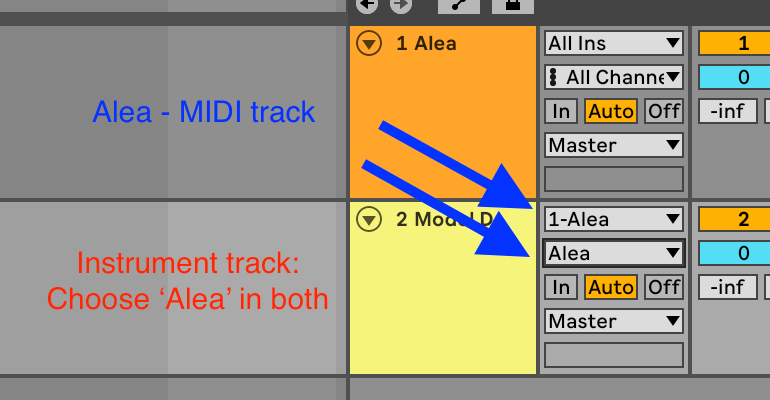
- Drop Alea onto a MIDI track.
- Create a second MIDI track and put any instrument on it.
- On the instrument track, set MIDI From to the Alea track, then open the chooser directly below it and pick Alea. That second chooser is the one people miss. Leave it on Post FX and you get nothing.
- Set Monitor to In on the instrument track, or arm it.
- Press play.
You should hear notes drawn from Scale A. From there, pick a preset, set up your own two scales, or start the morph moving and play against it.
Logic Pro and GarageBand
Load Alea as an AU instrument and set OUT to Internal Synth. Because Logic will not carry AU MIDI to another track, routing it into a different instrument is not a matter of finding the right setting: the path does not exist. If you specifically want Alea driving a Logic instrument, run the standalone app alongside Logic and send MIDI to it through the IAC Driver, which macOS provides in Audio MIDI Setup.
Bitwig and Reaper
Load the CLAP or VST3 on one track, then point a second track’s note input at it. Both hosts expose plugin note output as a normal source, so the routing looks like any other MIDI chain you have built before.
Using the standalone app with hardware
Open the standalone app and set OUT to your MIDI interface or synth. The app opens the device on its own, so you do not need a DAW in the chain at all. This is the setup to use when you want the computer out of the way and just want to play against the notes.
When you still hear nothing
Work down this list in order. It resolves nearly every case.
- The header dot should read playing while the host is running. If it does not, the plugin is not receiving transport from your DAW.
- Check the instrument track is armed or monitoring, and that its MIDI input really is the Alea track rather than Post FX.
- In the Scale Shifter, a morph parked at 100% B with an empty Scale B has nothing to play. Move the morph back toward A, or add notes to Scale B.
- A stuck note ends with one press of PANIC.
- In the standalone app, confirm OUT is set to Internal Synth or to a device that is actually connected.
The same routing works for both Alea instruments
Alea Chord Randomizer is built on the same output chain: MIDI to the host, the same ten internal sounds, the same OUT chooser. Everything above applies to it unchanged, so once you have one of them routed, the other takes seconds.
Use the method
Try it with Alea Scale Shifter
A MIDI plugin and standalone app that streams an endless random line from one scale while slowly morphing into another. VST3, AU and CLAP for macOS and Windows.
See everything Alea Scale Shifter does →