
hopsesh
Find your Claude Code sessions on your other machines and continue one here
- macOS
- Linux (CLI)
- Windows (CLI)
Install the CLI · macOS and Linux
curl -fsSL https://raw.githubusercontent.com/roeehrl/hopsesh/main/scripts/install.sh | sh Install the CLI · Windows, in PowerShell
irm https://raw.githubusercontent.com/roeehrl/hopsesh/main/scripts/install.ps1 | iex Free Version 0.1.0 · Open source, Apache-2.0 · Alpha · Not affiliated with Anthropic
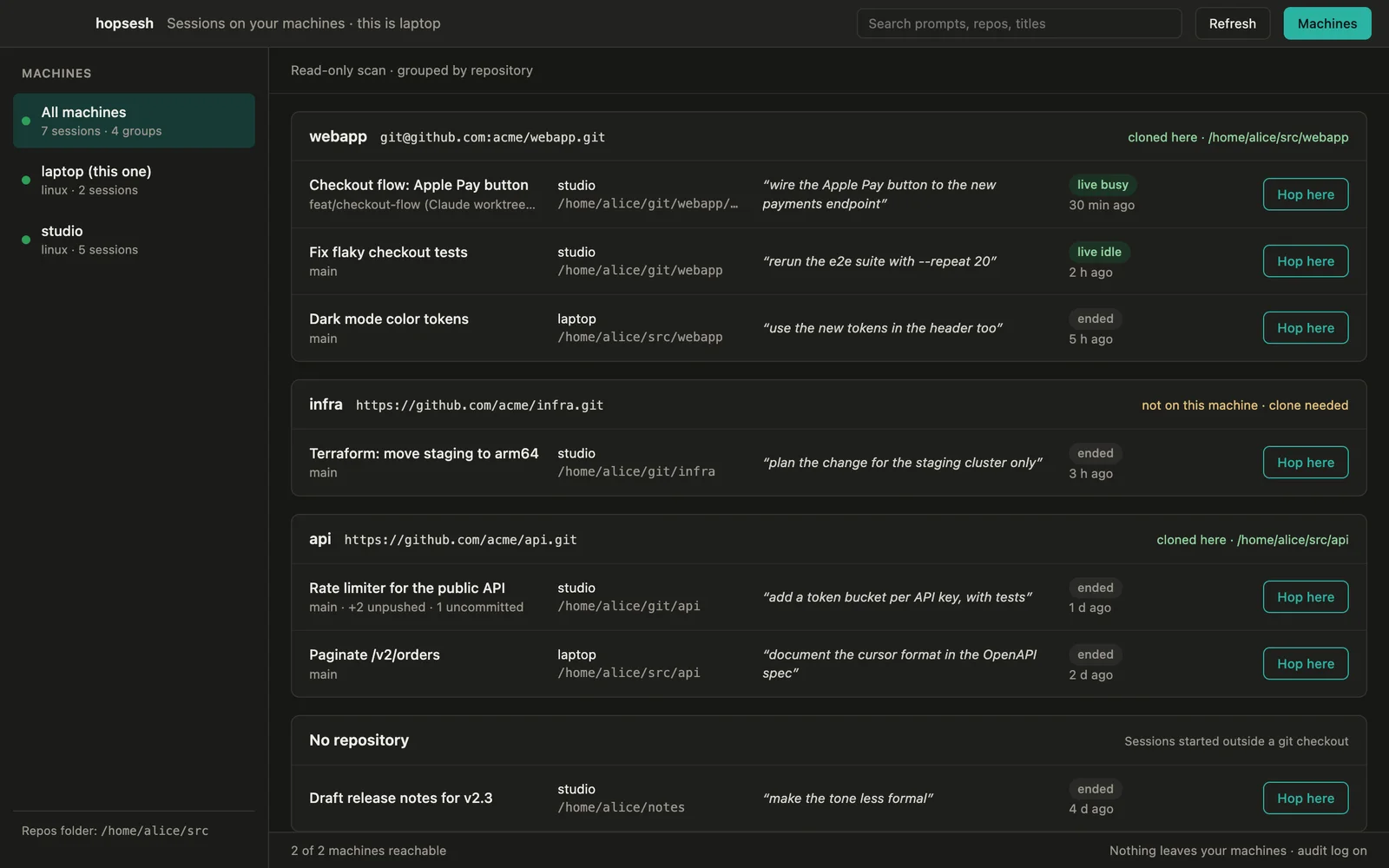
You started something in Claude Code on your desktop, and now you are on your laptop. hopsesh shows every session on all your machines and moves the one you pick here: repository, worktree, paths and all. Then it gives you the claude --resume command.
It finds your machines in Tailscale and ~/.ssh/config, and connects only to the ones you allow, with your own ssh, keys and agent. Nothing needs installing on the other machines. They need an SSH server and their Claude Code sessions, nothing more.
Every move is shown as a plan first: the repository here, or where it will be cloned; the worktree; unpushed or uncommitted work left on the other machine; and the paths that will be rewritten, Windows paths included. hopsesh undo reverses a move. The resumed session’s first message tells Claude it was moved and asks it to check that nothing is missing.
There is no hopsesh server, no relay and no telemetry, and hopsesh never calls the Anthropic API: only Claude Code itself talks to the model. It sits beside MyCNC, which drives the agents on a Mac from an iPad or iPhone. MyCNC brings the controls to you; hopsesh brings the session.
hopsesh is open source under the Apache License 2.0, and it is alpha software. It works end to end on macOS and Linux; Windows support is built but less tested. It is an independent project, not affiliated with Anthropic.
Inside the app
A look inside
-
Every session on every machine, in one list.
Grouped by repository, with the machine, path, branch, last prompt and whether it is running now.
It reads Tailscale and ~/.ssh/config, and connects only to the machines you allow.
-
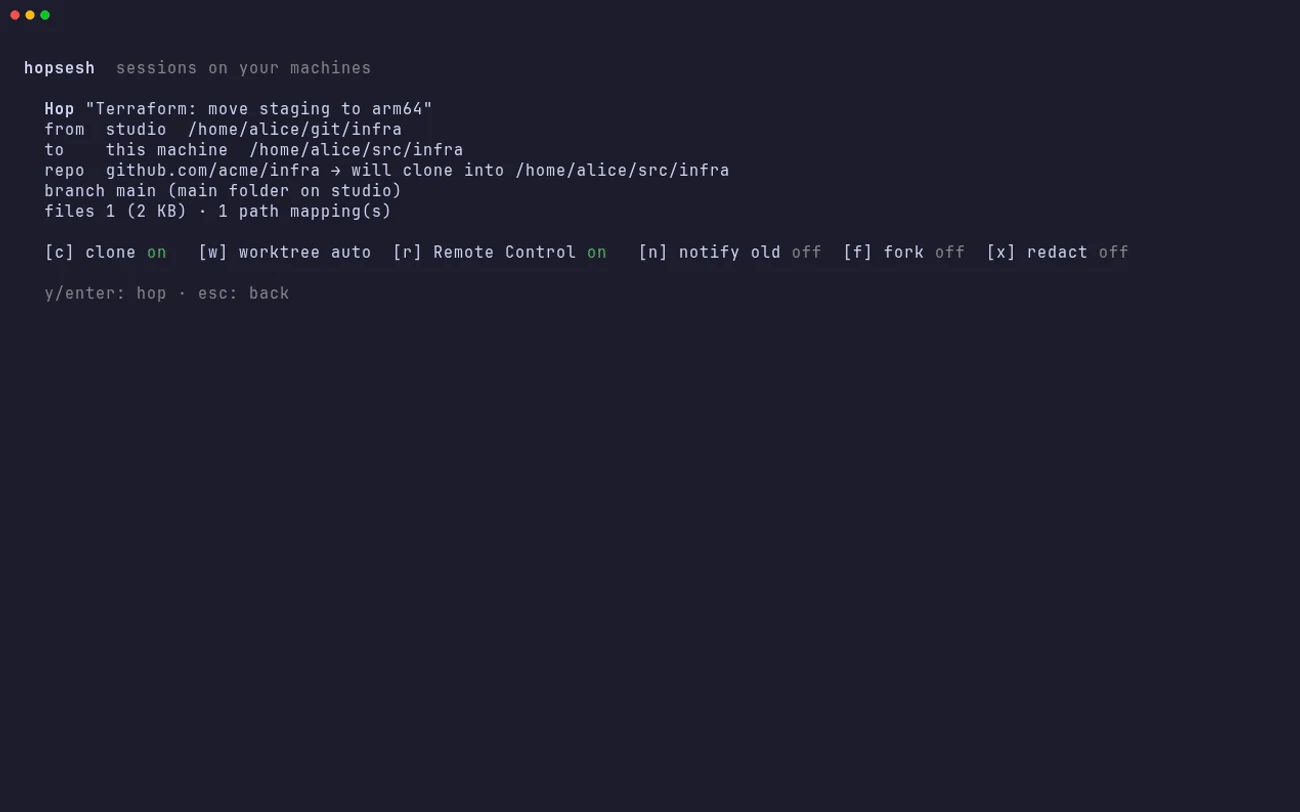
A plan before anything moves.
From where, to where, the repository and the branch, and how many paths it maps.
Not cloned here? Press c and it clones it first. Remote Control is one more key.
-
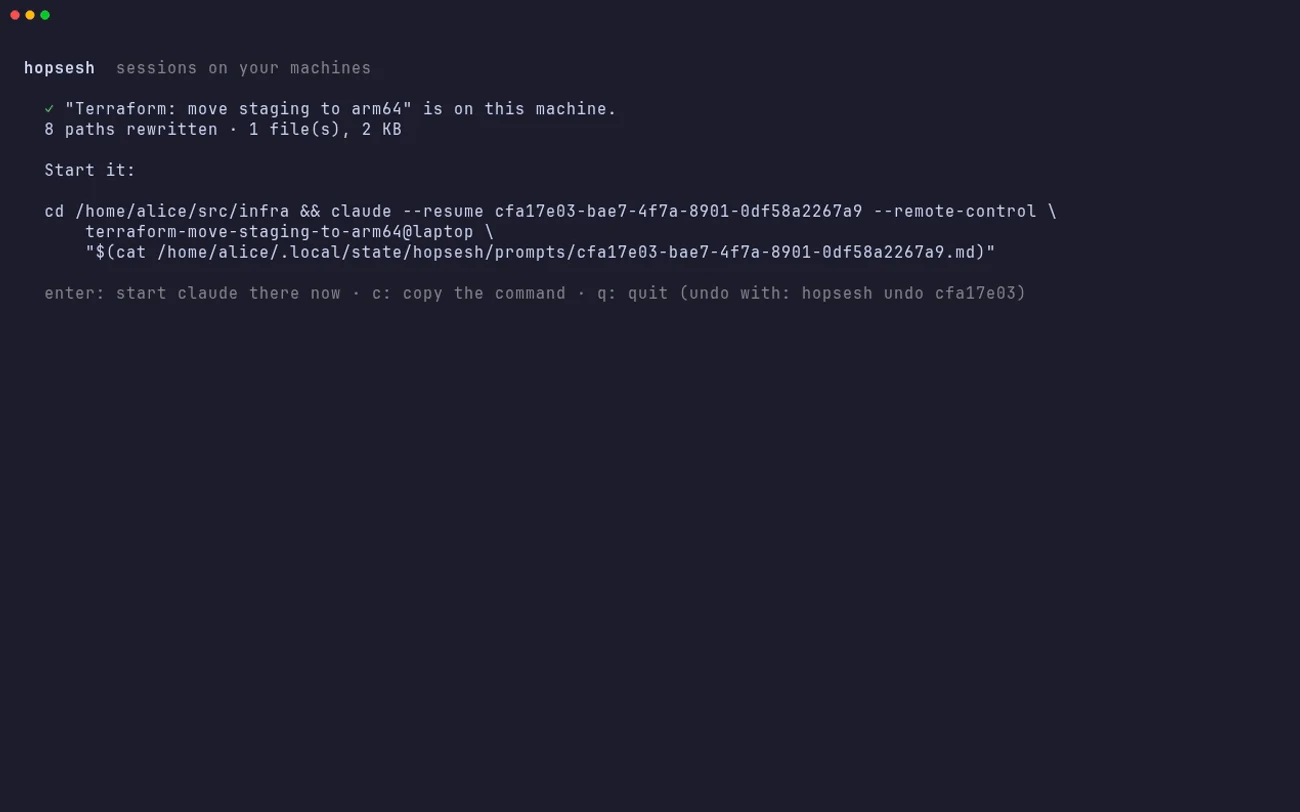
Then pick up where you left off.
Paths rewritten for this machine, then the exact claude --resume command to run.
The resumed session is told it was moved. hopsesh undo reverses it.
-
The whole hop, in the terminal.
The same engine as a CLI and terminal UI on macOS, Linux and Windows.
Made-up machines and sessions, recorded from the project’s own demo.


Built for the job
Who hopsesh is for
Claude Code on more than one machine
A desktop and a laptop, a work and a home machine, or a Linux box you reach over SSH. Continue the session where you are instead of starting over.
Different users, folders and systems
A different username, home folder or operating system on each machine is the case it was built for, Windows paths included.
People who keep it on their own machines
Sessions go machine to machine over your own SSH. No account, no server, no telemetry, and no copy of a transcript anywhere else.
Capabilities
What it does
Finds your machines
Reads Tailscale and ~/.ssh/config, including aliases, ProxyJump and ProxyCommand. It connects to nothing until you allow a machine, and shows each SSH host key for you to confirm first.
Every session, by repository
Machine, path, branch, worktree, last prompt, when it was last active and whether it is running right now, for every session on every machine you allowed.
The repository and worktree, here
Finds the repository on this machine by its remote, or clones it into your repos folder. A session from a worktree gets a matching worktree, so your checkout stays on its own branch.
Paths rewritten for this machine
Repository, home and config folders are mapped in one pass, including JSON-escaped Windows paths and separators between Windows and macOS or Linux. Session ids are never touched. Paths it cannot map are left as they are and listed.
A plan first, and undo
Nothing is written until you have seen the plan. Unpushed commits and uncommitted files on the other machine get a warning. hopsesh undo removes the copy and restores anything it set aside.
Resume, with Remote Control if you want it
Prints the exact claude --resume command, or runs it. It can start the moved session with Remote Control on and tell the old session where the work went.
Transcripts treated as secrets
Likely secrets are flagged while moving and can be redacted from the copy. Logins, keys and account data never move. Every remote action goes to a local audit log.
CLI, terminal UI and a Mac app
One engine behind all three, with --json output on the commands that list and move. The macOS app adds a preflight screen for each move.
Free and open source
Get hopsesh
curl -fsSL https://raw.githubusercontent.com/roeehrl/hopsesh/main/scripts/install.sh | sh Checks the download against the release’s checksums.txt and its signature. hopsesh update installs later releases with the same checks.irm https://raw.githubusercontent.com/roeehrl/hopsesh/main/scripts/install.ps1 | iex Same checks as the macOS and Linux script. Windows support is built but less tested than macOS and Linux.The short answers
Questions about hopsesh
Is hopsesh free?
Yes. hopsesh is free and open source under the Apache License 2.0.
Does anything leave my machines?
No. Sessions go directly between your machines over SSH. hopsesh has no server and no telemetry, and it never calls the Anthropic API. The macOS app can check GitHub once a day for new versions, only if you say yes.
Do I need Tailscale?
No. Any machine you can ssh to works, including aliases, ProxyJump and ProxyCommand from your ~/.ssh/config. Tailscale just makes machines easy to find.
Does the other machine need hopsesh installed?
No. It needs an SSH server (Remote Login on macOS, OpenSSH on Windows) and its Claude Code sessions. An optional helper makes listing faster on machines with long histories; it is pinned by SHA-256, listens on nothing and can be removed.
What if the session is still running on the other machine?
By default hopsesh copies it as it is and asks the old session to stop. With --fork, both copies continue independently. hopsesh refuses to overwrite a session that is running on this machine.
How is this different from claude --teleport or Remote Control?
Teleport brings a session from Claude Code on the web to your machine. Remote Control lets you drive a session that keeps running where it is. hopsesh moves a session between your own machines, so it continues with the files and tools of the machine you are at, and it can turn Remote Control on for the moved session.
What if the two machines use different Claude accounts?
hopsesh reads claude auth status on both sides. If the accounts differ, it leaves out thinking blocks, because they are signed for the original account.
How do I undo a move?
Run hopsesh undo with the session id. It removes the copy and restores anything it set aside. hopsesh undo with no arguments lists recent moves.
Is hopsesh made by Anthropic?
No. hopsesh is an independent project, not affiliated with, endorsed by or sponsored by Anthropic. “Claude” and “Claude Code” are trademarks of Anthropic, PBC, and appear here only to say what hopsesh works with.
Privacy by design
What hopsesh knows about you
- hopsesh collects nothing about you. No account, no analytics, no telemetry, no crash reporting.
- There is no hopsesh server. Sessions move only between your own machines, over your own SSH.
- hopsesh never calls the Anthropic API. Only Claude Code itself talks to the model, under each machine’s own login.
- The macOS app checks GitHub for new versions once a day, and only after you say yes.