LD Manager
Know what runs on your Mac. Fix what doesn’t
- macOS
Free Version 0.1.1 · Open source, MIT · Notarized by Apple · Not affiliated with Apple
A free, open-source, native macOS app and CLI for LaunchAgents and LaunchDaemons. LD Manager lists every launchd job on your Mac, your own agents, agents for all users, system daemons and Apple’s own, and joins every layer into one status: the plist file, whether launchd has it loaded, the enable or disable override, the Login Items switch, the PID, the launch count and the last exit code.
When a job fails, the Doctor names the cause in plain words and offers a fix. Every edit shows a diff before it is saved and keeps a backup, and the ldm command does the same from a terminal, with JSON output and a dry run that prints the exact launchctl commands. For the error people search for most, see launchctl “Bootstrap failed: 5: Input/output error”.
LaunchControl is the most complete paid tool for launchd, Lingon makes creating jobs easy, KnockKnock and BlockBlock list what persists on a Mac for security without managing it, and System Settings › Login Items has on and off switches. LD Manager is free and open source, and focuses on why a job is not doing what you expect. It is not affiliated with any of them, or with Apple.
Inside the app
A look inside
-
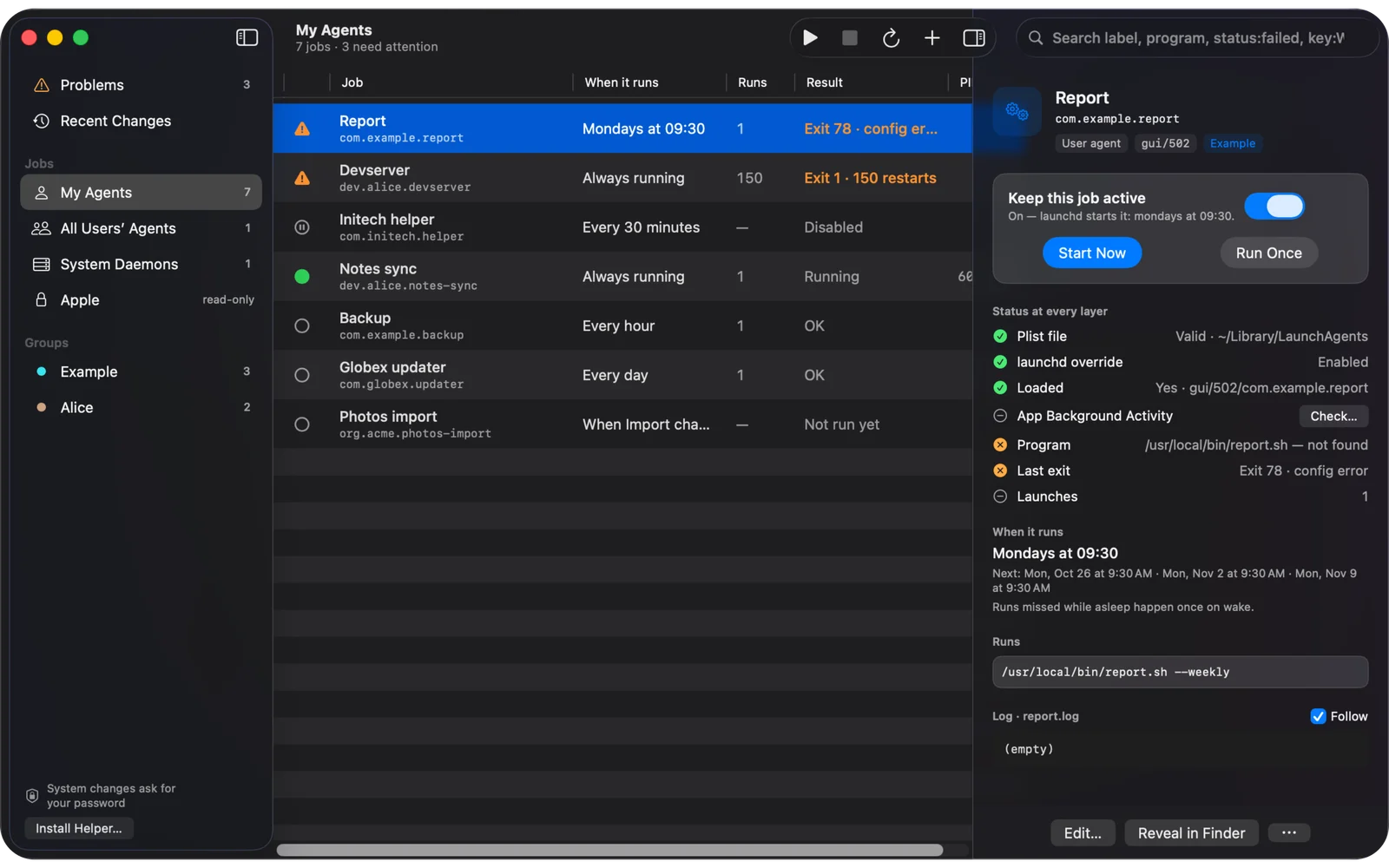
Every layer of a job, in one status.
The plist file, whether launchd has it loaded, the override, the Login Items switch, the last exit and the launches, side by side.
Here Report failed with exit 78, and the layers show why: its program is not there.
-
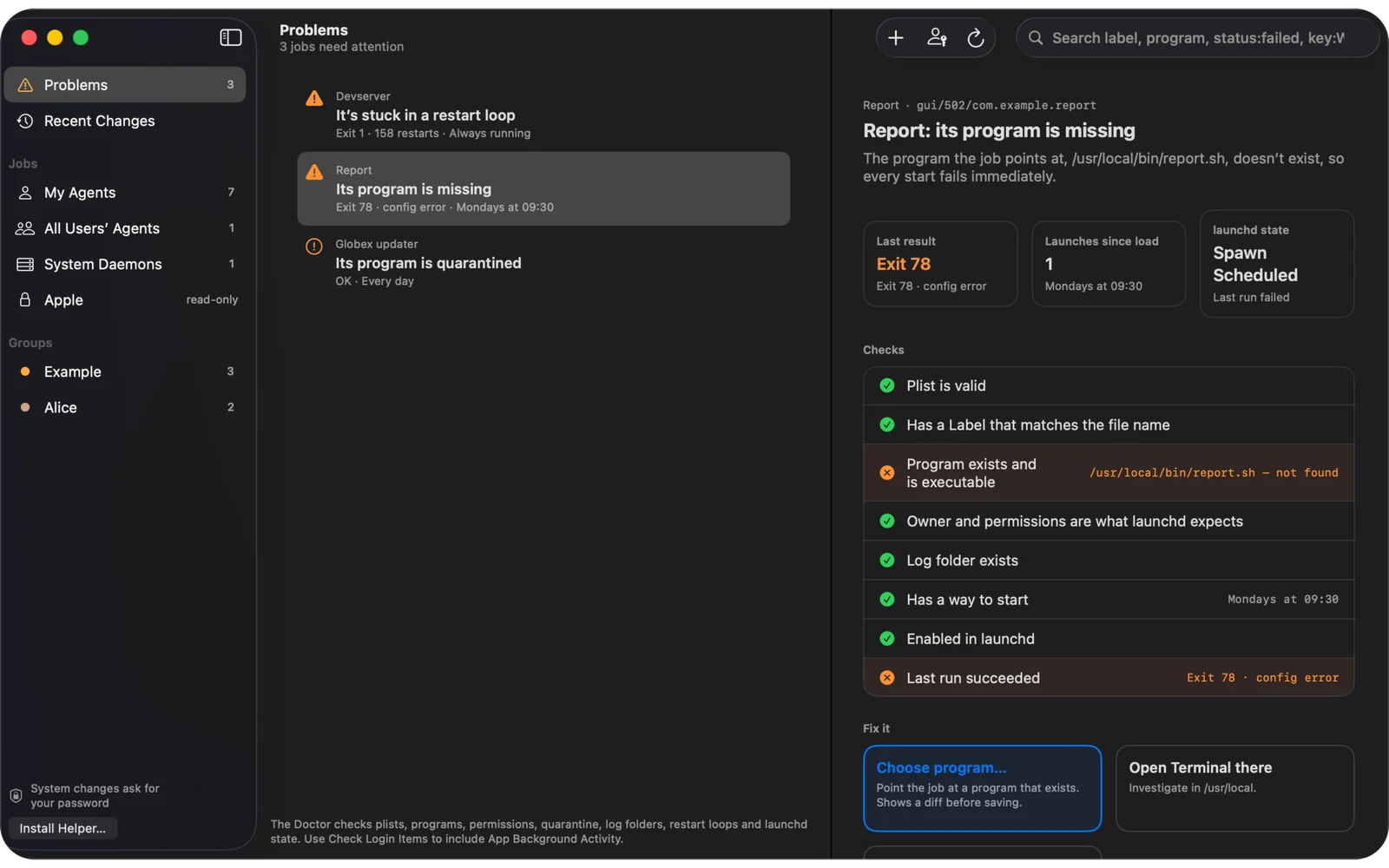
The Doctor names the cause.
Plists, Labels, programs, permissions, quarantine, log folders, restart loops and launchd state, each checked, with a fix offered for what fails.
Problems collects every job that needs attention.
-
A diff before every save.
Edit in a form, as keys or as XML. Only what you changed is written, so keys LD Manager doesn’t know stay as they are.
Every save keeps a backup, restorable from Recent Changes. Made-up jobs, recorded from the project’s own demo.
-
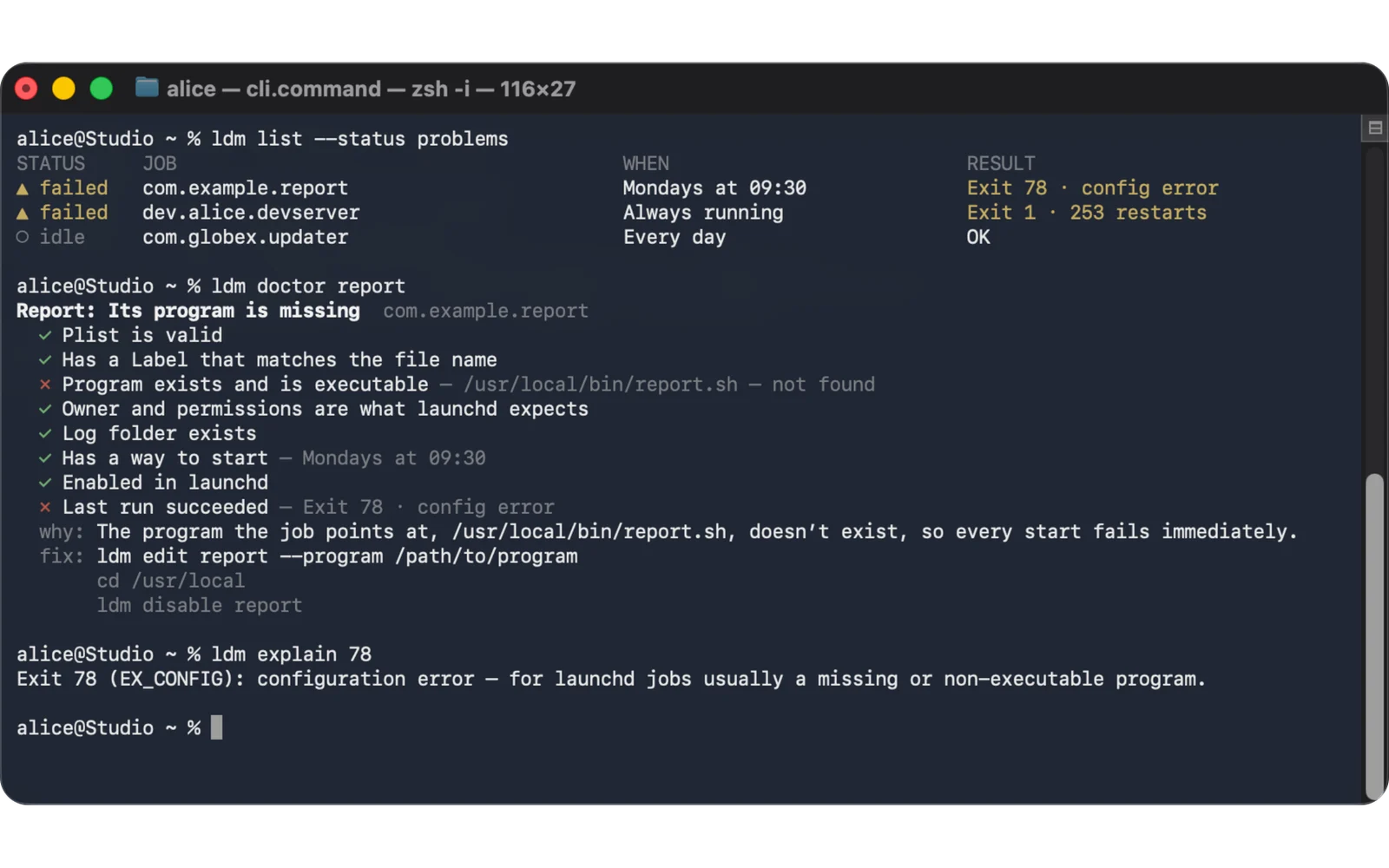
The same, from the terminal.
ldm list, ldm doctor and ldm explain 78, on the same core as the app.
--json for scripts, --dry-run to print the exact launchctl commands, and documented exit codes.


Built for the job
Who LD Manager is for
Mac developers who write their own agents
A dev server, a sync script or a nightly job in ~/Library/LaunchAgents. See whether launchd loaded it, why it exited, and edit it without retyping XML.
A Mac mini as a server
Homelab and always-on Macs running daemons for backups, media or monitoring. Catch restart loops and failed runs, and keep an eye on them from the menu bar.
Power users checking what starts at login
Every agent and daemon that apps installed, with the Login Items switch beside launchd’s own state, so you can tell what is running and what is merely allowed to.
Mac admins who script
ldm with --json and documented exit codes in your scripts, and --dry-run to see the exact launchctl commands before anything changes.
Capabilities
What it does
Every launchd job, every layer
Your LaunchAgents, agents for all users, system LaunchDaemons and Apple’s own, read-only. Each job joins its plist file, whether it is loaded in launchd, its enable or disable override, the Login Items “App Background Activity” switch, PID, launch count and last exit code into one status: running, waiting, failed, disabled, off in Login Items, not loaded or invalid.
The Doctor
Checks for invalid plists, missing Labels, programs that are missing, not executable or quarantined, an unexpanded ~ in a path, wrong ownership or permissions, missing log folders, restart loops, jobs enabled but not loaded, and failed runs, and offers a fix for each.
Schedules and exit codes in plain words
StartCalendarInterval reads as “Mondays at 09:30” with the next runs listed. Exit codes are explained: 78 is EX_CONFIG, usually a missing or non-executable program, and -15 means the job was killed by SIGTERM.
Lossless editing
Edit in a form, as keys or as raw XML. Changes go into the file’s own dictionary, so keys LD Manager doesn’t know survive, and you see a diff before every save.
A backup for every save
Each save keeps a backup of the file it replaced. Recent Changes lists them, and any one can be restored.
In the menu bar
A menu bar extra shows how many jobs have problems, with switches for the jobs you pin.
An optional helper for system jobs
Approve the privileged helper once in System Settings › Login Items and changes to system jobs stop asking for a password. Without it, LD Manager uses macOS’s own administrator prompt.
The ldm command line
The same core in a terminal: list, show, doctor, start, stop, restart, load, unload, enable, disable, logs, new, edit, remove, explain and helper. --json for scripts, --dry-run prints the exact launchctl commands, and documented exit codes: 0 ok, 1 error, 2 usage, 3 no such job, 4 authorization, 5 launchd rejected, 6 the Doctor found problems.
The short answers
Questions about LD Manager
Is LD Manager free?
Yes. LD Manager is free and open source under the MIT licence. The source is on GitHub.
Can I download it yet?
Not yet: there is no release. The source is on GitHub now, and a signed and notarized download for macOS 26 or later comes with the first release.
What is the difference between a LaunchAgent and a LaunchDaemon?
A LaunchAgent runs as a user, in that user’s session: your own are in ~/Library/LaunchAgents, and agents for every user are in /Library/LaunchAgents. A LaunchDaemon runs in the system domain, usually as root, from /Library/LaunchDaemons, whether or not anyone is logged in. Apple’s own agents and daemons live in /System/Library, and LD Manager shows them read-only.
Why does my launchd job exit with code 78?
78 is EX_CONFIG, a configuration error. For a launchd job it usually means the program it points at is missing or not executable: check the path in Program or ProgramArguments, that the file exists and is executable, and that the path does not start with ~, which launchd does not expand. The Doctor checks each of these, and ldm explain 78 prints the meaning.
Does LD Manager need my administrator password?
Not for your own agents. Changing agents for all users or system daemons needs administrator rights: LD Manager asks through macOS’s own administrator prompt, or, if you approve its optional helper once in System Settings › Login Items, without asking each time.
Will editing a plist in LD Manager lose keys it doesn’t know?
No. Changes are applied to the file’s own dictionary, so keys LD Manager doesn’t show in its form stay as they are. You see a diff before every save, and each save keeps a backup you can restore from Recent Changes.
Can I use it from scripts?
Yes, with ldm. It prints --json for scripts, --dry-run prints the exact launchctl commands instead of running them, and the exit codes are documented: 0 ok, 1 error, 2 usage, 3 no such job, 4 authorization, 5 launchd rejected, 6 the Doctor found problems.
Why isn’t LD Manager on the Mac App Store?
Apps on the Mac App Store must be sandboxed, and a sandboxed app cannot drive launchctl. LD Manager is distributed directly instead.
Does LD Manager connect to the internet?
No. It makes no network connections, has no analytics and no account. It reads launchd’s state through launchctl and the plist files on your disk.
How is it different from LaunchControl, Lingon or KnockKnock?
LaunchControl is the most complete paid tool for launchd. Lingon makes creating jobs easy. KnockKnock and BlockBlock list what persists on your Mac for security review, but don’t manage jobs. System Settings › Login Items has on and off switches only. LD Manager is free and open source, joins every layer of a job’s status into one, and focuses on why a job is not doing what you expect. It is not affiliated with any of them.
Is LD Manager made by Apple?
No. LD Manager is an independent project, not affiliated with, endorsed by or sponsored by Apple. Mac and macOS are trademarks of Apple Inc.
Privacy by design
What LD Manager knows about you
- LD Manager collects nothing about you. No account, no analytics, no telemetry.
- It makes no network connections. Everything it does happens on your Mac.
- It reads launchd’s state through launchctl and the plist files on your disk, and writes only the plists you edit, their backups, a cache and its own settings.