hopsesh guide · Claude Code and Codex
How to continue a Claude Code session in Codex (and back)
Why switching agents is a conversion, not a copy: the handoff note, Codex’s own importer, what is always lost, and a round trip that keeps the original session intact.
Claude Code and Codex both keep every session as a file on your computer, but not the same kind of file, and neither can open the other’s. Here is what each one stores, why a session cannot be copied across as it is, what the handoff note and Codex’s own importer get you, what never carries over whichever way you do it, and how hopsesh continues a session in the other agent, across machines and back again.
What each agent stores
Claude Code writes each session to ~/.claude/projects/<project>/<session-id>.jsonl, where <project> is named after the directory the session ran in (CLAUDE_CONFIG_DIR moves the whole tree). Its tool calls name Claude Code’s own tools, such as Bash, Read, Edit and Write. Its reasoning is kept as thinking blocks, signed for the account that made them. Its project instructions are in CLAUDE.md.
Codex writes each session to ~/.codex/sessions/YYYY/MM/DD/rollout-<time>-<id>.jsonl (CODEX_HOME moves it), finds it by its id, and keeps its own indexes alongside. Its tool calls name Codex’s tools, such as shell, apply_patch and update_plan. Its reasoning is stored encrypted. Its project instructions are in AGENTS.md.
Both are JSON Lines: one record per line, appended as the session goes. That is where the resemblance ends. The records have different shapes, the tool calls name each agent’s own tools, and Claude Code finds a session by the folder of the directory it ran in, while Codex files it by date.
Why you can’t copy a session across as it is
Renaming a Claude Code .jsonl and dropping it into ~/.codex/sessions gives Codex nothing it can read. Even a careful conversion runs into four things:
- The tools are different. A Claude Code session is full of
EditandReadcalls with their results. Codex has no tool by those names, so it cannot take those calls as its own. Converted, they become a record of what the other agent did, as text. - The reasoning is private to its vendor. Claude Code’s thinking blocks are signed, and only Anthropic’s side can check them. Codex’s reasoning is stored encrypted, and only OpenAI’s side can read it. Neither model can be handed the other’s, so reasoning is always left out.
- The instructions differ. Claude Code reads
CLAUDE.md, Codex readsAGENTS.md. Whatever only the first agent read, the second has never seen. - The context windows differ. A long session may not fit the other model as it is, so the oldest steps have to be shortened or summarised.
So continuing in the other agent is always a conversion, never a copy. The useful question is how much survives it, and whether you can see that before you start.
The low-tech way: a handoff note
The simplest method needs no tools. Before you switch:
- Ask Claude Code to write a handoff note to a file: the goal, what is done, what is left, the decisions made and why, and anything that failed.
- Commit your work, so the code and the note are on disk where Codex will look.
- Start Codex in the same repository and tell it to read the note and continue.
This is robust and works in any direction, between any two agents. What you lose is the conversation itself: Codex knows only what the note says, and nothing of the exchanges that led there.
Codex’s own importer
Codex can import Claude Code sessions on its own. In a local Codex CLI session, type /import, choose Claude Code, and pick the setup, project files and recent chats you want. The CLI imports up to 50 chats from the last 30 days; the desktop app has the same under Settings → Import. /import is not available while a task is running, in a remote session, or while connected to the local app-server daemon. Review the imported setup before you rely on it, especially tools and permissions.
OpenAI’s Codex plugin for Claude Code adds a second route: /codex:transfer, run inside a Claude Code session, creates a Codex thread from it and prints the codex resume command.
Both are good at what they do, and both work on the computer where the Claude Code session already is. They go one way, from Claude Code into Codex. As of this writing Claude Code has no built-in importer for Codex sessions, so there is no official way back.
What doesn’t carry over, whichever way you do it
- Reasoning. Claude Code’s thinking and Codex’s encrypted reasoning stay with their own vendor.
- Tool calls as calls. The other agent sees what was run and what came back, as history, not as calls it made itself.
- Long outputs and old steps, when the history is too long for the other model.
- Instructions only one agent read, unless you bring them along.
- Anything not in the repository on disk. The session is the conversation, not the code. On one computer the code is already there; across two, it has to follow.
Doing it with hopsesh
hopsesh is a free, open-source command-line tool, terminal UI and app for macOS and Windows that moves coding-agent sessions between your machines and between agents. Claude Code and Codex are supported today, each as a module behind a small SDK.
hopsesh plan studio:"fix flaky tests" --in codex   # see what carries over, change nothing
hopsesh pull studio:"fix flaky tests" --in codex   # then do it
Leave out the machine name (hopsesh pull "fix flaky tests" --in codex) to take the newest copy of the session, wherever it is: on this computer, or on one of your others over SSH. --in claude goes the other way. In the app, on macOS or Windows, every session has Continue in…, with the same plan as a sheet.
The conversation arrives in the other agent’s own session format, in one of these forms:
- history, the default: the conversation as text, with tool activity labelled as the previous agent’s, long outputs shortened and the oldest steps summarised when the history is long;
- note (
--fidelity note): only the briefing; - native replay (
--native, experimental): exact shell calls replayed as the other agent’s own, where it can; - Codex’s importer (
--via import): Codex converts the Claude Code session itself, and hopsesh adds its briefing and keeps the result undoable.
The loss report
Every plan shows a loss report before anything is written: what was kept, what was shortened or summarised, which paths were mapped for this machine, and what was left out. Reasoning from the other vendor is never carried, and the report says how much of it there was.
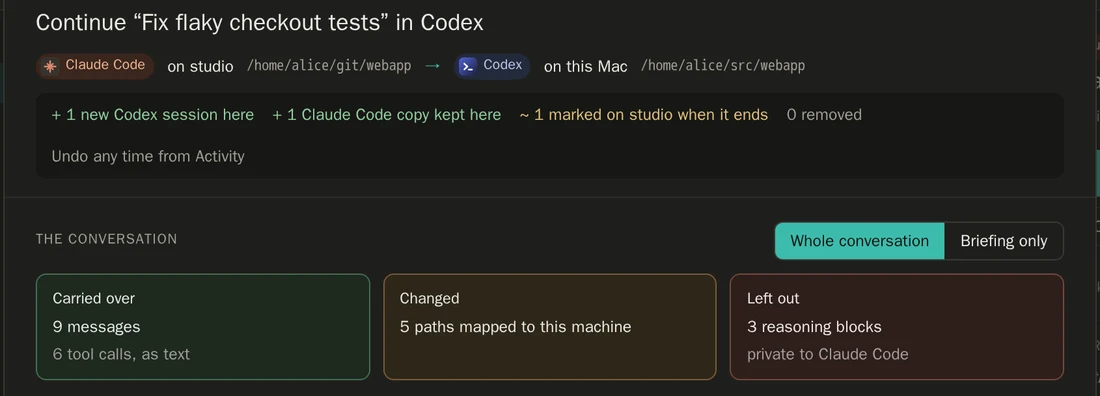
The briefing
The other agent also gets a briefing at the end of the history: where the session came from, that the tool names in it are not its own, what to verify first (git status, and the commit at the time of the transfer), the open plan, and the instruction files only the previous agent read. --note-file adds a handoff note of your own, and --carry-rules adds your instructions for every project. Nothing is sent to a model unless you start the session; --go starts it with “Continue.”
Round trips that keep the original
Continue a Claude Code session in Codex, work on it, then bring it back to Claude Code: hopsesh adds only the new work to the original session. Its earlier turns, signed reasoning included, stay byte for byte. If both copies changed in the meantime, hopsesh stops and asks; --keep-both brings the new work in as a separate session. It never merges.
The copy left behind is marked in its agent’s own list, as ↪ continued in Codex on <machine> · <title>, and a small file beside each session records its copies and hops, so the next move works from any of your machines.
Across machines
Continuing on another machine works the same way: hopsesh finds the repository there or clones it, recreates the worktree, and brings the code to the session’s commit, fetching it straight from the other machine if it was never pushed and fast-forwarding only a clean checkout. When the source agent is installed there too, it also keeps that agent’s own copy of the session there, so a later return adds only the new work.
When the other machine runs hopsesh too and has turned on receiving (hopsesh receive on), you can send a session from here instead: hopsesh push <session> <machine>. Either way, hopsesh undo reverses the move on every machine it touched.
If you would rather ask than type, hopsesh skill install teaches Claude Code and Codex to use hopsesh. Ask “continue this in Codex” or “bring my laptop session here”: the agent plans first and moves only after you say yes.
hopsesh has no server and no telemetry, and it never calls the Anthropic or OpenAI API: only your agents talk to their models. It is alpha software, and an independent project, not affiliated with Anthropic or OpenAI.
Switching between Claude Code and Codex
Can Codex resume a Claude Code session?
Not as it is. The two agents store sessions in different formats with different tools, so a Claude Code session has to be converted first. Codex’s own /import does that on the same computer, and hopsesh does it on one computer or across two, in either direction.
How do I import Claude Code chats into Codex?
In a local Codex CLI session, type /import, choose Claude Code and pick the recent chats you want. The CLI imports up to 50 chats from the last 30 days. In the Codex desktop app it is under Settings → Import.
Can I move a Codex session back into Claude Code?
Claude Code has no built-in importer for Codex sessions. hopsesh continues a Codex session in Claude Code with --in claude, and when the session started in Claude Code, it adds only the new work to the original, whose earlier turns stay byte for byte.
Does Claude’s reasoning carry over to Codex?
No. Claude Code’s thinking blocks are signed for Anthropic and Codex’s reasoning is stored encrypted for OpenAI, so neither can be handed to the other model. The conversation, the tool activity as text and a briefing carry over; hopsesh’s loss report shows exactly what was left out.
Can I continue a Claude Code session from another computer in Codex?
Yes, with hopsesh: hopsesh pull <machine>:<session> --in codex brings it over SSH, finds or clones the repository, brings the code to the session’s commit and writes it as a Codex session here. Codex’s own importer only sees sessions on the computer it runs on.
What should I tell Codex when it takes over?
Where the session came from, what is done and what is left, and what to check first: git status and the commit it was at. hopsesh writes that briefing for you, with the open plan and any instruction files only Claude Code read, and adds your own note with --note-file.
Use the method
Try it with hopsesh
Open-source CLI and desktop app that moves Claude Code and Codex sessions between your machines over SSH, or continues one in the other agent, with undo.
See everything hopsesh does →curl -fsSL https://raw.githubusercontent.com/roeehrl/hopsesh/main/scripts/install.sh | sh Checks the download against the release’s checksums.txt and its signature. hopsesh update installs later releases with the same checks.irm https://raw.githubusercontent.com/roeehrl/hopsesh/main/scripts/install.ps1 | iex Same checks as the macOS and Linux script. The Windows app installs this command as well.